
As I move through the 31-Comment Challenge (ok, I’m behind), I’ve been thinking about ways to help students improve their commenting skills. Via Donna DesRoches‘s “Blogging and Reading Comprehension Strategies,” I found a great free resource to provide some scaffolding for young bloggers: Comprehension Strategy Posters provided by ReadingLady.com.
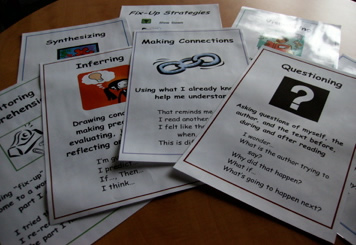
The posters are available in both Word and PDF formats and include:
- Asking Questions
- Determining
- Inferring
- Making Connections
- OWL (Observe, Wonder, Link)
- Repairing Comprehension
- Synthesizing
- Visualizing
If students were encouraged to focus on one strategy per week, and could refer to the posters, teachers might see less of the “I liked your post” one-liner responses and more of the thoughtful kind of writing the improves literacy skills – and bumps up the learning possibilities of the blogging project. I like how Donna explains the importance of encouraging better commenting: “Blogging is a great communication tool but it is the use of effective commenting skills that will extend and engage global conversations for our students.”
*Note: Image from http://classroomtechtips.files.wordpress.com/2008/05/readingstrategies.jpg
3 Comments
Leave a reply →