Jul
01

Alan opened the session with a look at where technology is going in the future, via a TED session - Oh my, in mass production of “wearable tech” won’t cost more than a cell phone.

Ideas for designing rigorous and globally connected assignments:

Suggestion 1 - Teach students ethics of content development - have students create code of ethics. Critical piece - teaching kids how to behave when they’re not in school.

Suggestion 2 - Think about and question what skills can we teach today that will outlast any technology? The real revolution is not technology, it’s information and global communication Implication: what’s flowing through wires is more important than the wires. But teachers need to ask what information do we need and what relationships.

Suggestion 3 - Globalize the curriculum. Question: Are there any points in the curriculum for students to think globally? (ie, Teaching American Revolution - only from American point of view? or ask students to find sources in England that deal with the American Revolution. But teach them how to find pieces written from a British perspective. Tech Tip: Try Google trick: site:ac.uk “General Gage” “American Revolution”. Coming up with some “404 Not Found”s? No problem. Head to the wayback machine to get archived articles. Alan used the Wayback Machine to bring up article on General Gage written in 2006 by Thomas Ash. When you show students a different point of view they are more engaged. Nothing like a little dissonance to enliven the research process!

Suggestion 4 - Design assignments where you cannot plagiarize - No more “go to the Internet and get a source”; instead “find 5 different university viewpoints that differ from textbook.” Pedagogy trumps technology. Assignment design should be built into staff development.

Suggestion 5 - Every department should find assignments that require a global view. For example, what if assignments were so compelling that students would even work on them beyond the school day? Student News/Action Network - started by group of kids at Washington International School. We need to give kids environments that are so globally connected that they will want to keep going back - even after the school year.

Session Gem: Ownership of learning needs to shift to students. How about starting the school year by identifying 10 most difficult concepts to teach in your subject area. Ask students to come up with the solutions. Oh, wow, so simple, so powerful - and would work across the curriculum!!

I’m joining Jamie McKenzie’s last session of the day: teaching media literacy. We’re looking at the of wikilobbying (coined by Stephen Colbert - whose video we’re watching, which has unfortunately been removed from YouTube). So the question is “how do we alert our students to how Wikipedia works?

Phtoshopping Reality - Activity: Show Evolution video from Dove. What question of import would we ask students when sharing this video? Well then, checkout the slob evolution version. How about comparing these two versions to the Green Peace version Dove Onslaught(er).

“Media literacy deserves a prominent placement in district curriculum documents, especially in English/language arts classes” - http://questioning.org/june09/video.html. Jamie is following up this statement with Dove Onslaught video with discussion on deconstructing video and ads. Question: how does “crescendo” (which is a film technique) play a part in this video? Music gets louder, pictures get increasingly horrifying.

More Media Literacy Resources:

It’s been a long time since I’ve looked at Jamie McKenzie’s work. Even at a glance, I can see that the websites he has shared are rich with content and thought-provoking ideas.

I’m drawn to this session because the write-up states “model has your students investigating and answering higher-level questions.” The presenters are from Deep creek Magnet Middle School, outside of Baltimore.

A slam dunk model has 5 basic steps:

  1. questioning
  2. information sources
  3. activity
  4. assessment activity
  5. enrichment (extended) activities

Here’s a link to the session wiki - http://slamdunknecc09.pbworks.com/

Why PowerPoint? To help ‘late adopter’ teachers. Jamie McKenzie has already created the PowerPoint template - http://slamdunknecc09.pbworks.com/f/slam+dunk+template.ppt. The idea is to make it easy for teachers to organize the project for students, including providing the links.

Session was a good combination of Jamie McKenzie resources and a truly simple way to introduce late adopters to using technology (which hopefully filters down to their students).

Jun
29
Filed Under (21st Century Toolbox, NECC) by blogwalker on 29-06-2009 and tagged ,

Mitch Resnick, from MIT, is leading the Scratch session. Scratch is all about creating, building, and inventing - to be makers of things. You can’t be fluent in digital media just by interacting; you need to also be able to create.

Bridging Divides:

  • making and interacting
  • art and engineering
  • creativity and systematicity
  • individual and community
  • inside and outside school: Reading, for example
  • physical virtual

Scratch initiative - allows you to create interactive media - and share - via YouTube type website. Everyday an average of one new project a minute is posted (12 -13 year olds the highest users, but extends from age 7-50.) Program allows you to download existing projects and adapt to make personal. Remixing has become a cornerstone. Lots of shared expertise.

My Red Neptune -This young Scratch developer is thinking creatively, reasoning systematically, working collaboratively. Probably 3 most important skills for succeeding in 21st century.

Scratch kids are becoming computational thinkers.The Scratch team wants to promote possibilities for everyone to think computationally. To be a computational thinker, you need to be a computational creator. Sample: Rapa Nui - science fair project measuring response times. Tons of cross-curricular ways. Checkout Expo Elementary gallery!

Scratch broadens the range of participatory storytelling. Oh, wow, so many possibilities for engaging and stretching learners…and Scratch is free! So how do we get the word out to more educators? Join the Scratch community of educators at http://scratched.media.mit.edu.

Jun
29

So glad to see that Jamie McKenzie is offering three sessions at NECC. It’s been way too long since my last visit to fno.org. His opening session is on synergy and collaboration.

Synthesis - Do we actually teach it? Have we been taught how to synthesize ? Yet we expect students to be able to synthesize - http://questioning.org/sum08/bettering.html. Check out De Bono’s Thinking Hats for way of introducing “sideways explorations.” We need to equip students with creative thinking tools, such as thinking Box, Visual Thesaurus, and Scamper.

We’re on to Wikipedia, checking out the entry for educational technology - which is written in “legalize” terms. Jamie’s jumped in to do some re-writing. How often do we encourage our students to do re-writes in Wikipedia. (IP addresses in my district are blocked from editing in Wikipedia due to students posting inappropriate information regarding their middle school.) Ask students to check articles for currency.

Handout for session available at http://fno.org/sum08/synergy.html.

I’m in my first workshop for NECC 2009 - Renee HobbsFair Use for Educators session. With copyright being such a huge and complex issue, I’m hoping to get a better handle on all those sticky issues teachers deal with increasingly as they led their students onto online learning and producing of content.

Joining Renee Hobbs are Joyce Valenza, who just shared the wiki for this event - http://copyrightconfusion.wikispaces.com/; Mike RobbGrieco, and Kristen Hokanson. There’s even a link to the session handout!

Renee has kicked off the session by assuring us that by end of the three hours all our questions on copyright will be answered:-)

She’s starting by walking us through her slide presentation, which I’m annotating below:

  • What is media literacy? “It’s the sharing of meaning through symbolic forms.”
  • Question: What’s the purpose of copyright? Partner activity
    • owner’s rights
    • ability to make a profit
    • other?
  • Purpose of copyright is to promote creativity, innovation and spread of knowledge - Article 1, Section 8 US Constitution. So where did our misunderstandings come from?
  • Section 110 copyright law - allows teachers to share entire video despite “for home use only” statement. Section 107 1976 - “The right to use copyrighted materials freely without payment or permission for purposes such as ‘criticism, comment, news reporting, teaching, scholarship, and research.”
  • How Teachers Cope:
    • see no evil
    • close the door
    • hyper-comply
  • How does fair use apply to using popular and mass media? We’re watching the Center for Social Media video - http://mediaeducationlab.com/video -overview - which I watched for the first time last fall - and realized I could no longer use Hall Davidson’ niffy two-page chart. It’s all about “Transformativeness” = adding new meaning and value to an original works.
  • Myth buster: There are no cases of educators being sued for using copyrighted materials for teaching and learning who have actually sued. “Reasonable standard” of fair use - exempts educators liability if you made a reasonable attempt to comply with copyright as pertains to educational purposes.
  • Fair use reasoning in action: “When a user of copyrighted materials adds value to, or re-purposes materials for a use different from that for which it was originally intended, it will likely be considered transformative use; it will also likely be considered fair use” - Joyce Valenza. This is huge piece of the fair use puzzle!

Remix in Eduction - Mike RobbGrieco - also with Renee at Temple University - “Our students are fully immersed in remix culture. Remix is a way to make sense of our culture - but also well-suited for commentary, critique, and democratic exchange.”

  • Questions to ask: (and the video is incorporated into lesson - p 17 of handout).
    • benefit to society vs. cost to copyright older
    • transformativeness (is purpose transformed: is context transformed?
    • What is the effect on potential markets?
    • What is the amount of source text used

Back to Renee - How do you grab clips from DVDs - which are encrypted with the purpose of preventing copying? Renee went to Library of Congress Copyright Office regarding ability to de-encript DVD clips. She’ll know in October if her request will become a reality. And she emphasizes that “If we don’t claim our right, they’ll erode into ‘pay for click.’”

Kristen Hokanson - Oh, my… Watch Kristen’s video on her Upper Merrian Case Study. She’s also created a PDF worksheet to guide teachers. Check out her hands-on Scenarios! We broke into groups to work with the cards, which generated very focused conversations. Great stuff!!

This workshop is the only fee-based one I’ve signed up for. It was worth every penny! I actually feel that I have a handle on fair use for educators - and am looking forward to taking this training and resources back to my district.

Jun
23
Filed Under (PowerPoint, Slideshows) by blogwalker on 23-06-2009 and tagged , , ,

I had the opportunity to participate in last week’s Computers and Writing 2009 Conference at UC Davis. One of the highlights of the conference was getting to hear Bill Cope’s Saturday keynote: The Social Web: Writing in the Era of Digital Reproduction. The good news is that Bill’s keynote was recorded and I know that immediately following his address, participants cornered conference organizer Carl Whithaus with the request to post the presentation in the same way CUE posted Marzano’s presentation (PowerPoint slides in the background or as close-ups, with Marzano narrating each one), or to upload the presentation WITH the accompanying podcast.

I find it frustrating to view the many PowerPoints educators have generously uploaded to Slideshare and other venues WITHOUT an audio file or script to clarify the meaning and intent of each slide. As for Bill Cope’s presentation, each slide is probably fairly self explanatory - but, oh my, hearing Bill explain and build the case for teaching multimedia literacy is a tool every educator and administrator should have access to. So as soon as that resource is available, I’ll post the link.

In the meantime, I’ll point you to a few other PowerPoint resources I gleaned from the conference. Although I missed Fred Johnson’s Friday morning Starting with Bad PowerPoint, NCTE ACE colleague Rich Rice shared the handout. Fred has posted links to some great resources, including his own thought-provoking When Textual Technologies Transform Writing PPt, but, darn, no audio….yet.

Thanks to Fred’s site and a handout from Betsy Gilliland, also a CW2009 presenter, here are some great resources for moving  your slidehshows from bad to good:

Heading off to update some PowerPoints…
 

Jun
14
Filed Under (EL, ELL, English Language Learners, VoiceThread) by blogwalker on 14-06-2009 and tagged ,

Last week a 4th grade teacher in my district mentioned in passing that her team was looking at movie making as a way to boost skills of their ELL students - in a way that would also boost skills of their non-ELL students.  I can’t wait till next year to continue the conversation with her.

Thinking back to the first 4th grade video team I worked with this year as part of an EETT grant, as the group moved into the editing mode, each student picked a role. As the editing session went on, one student, not known for being able to maintain very well behavior-wise throughout an average school day, assumed a new role: wordsmyth. Each time the group would stop to debate a possible better word choice, this student spontaneously contributed a “$5 word.”  I loved being able to listen in on  student-generated conversations on vocabulary.

Last week I wrote about VoiceThread, using the 4th grade project I’ve embedded below, as being a tool for combining writing and technology to promote resiliency. But VoiceThread, like movie making, also builds on the four spheres of language.*; not just reading and writing, but also the often neglected listening and speaking. (*Note: I recommend reading Kevin Hodgson’s post on literacy and writing.)

I have in front of me Omar Lopez’s Lighting the Flame  of Learning for English Language Learners Through the Use of Interactive Whiteborard Technology. I think the “high-quality instructional strategies” he lists apply to VoiceThread as well as IWBs (maybe even more - and VoiceThread is basically free for educators):

1. Learning builds on previous experiences and therefore, ELL teachers need to incorporate ELLs’ prior knowledge, culture, interests, and experiences in new learning.

2. Learning takes place in a social setting and therefore ELL teachers need to provide opportunities for ELL student-interactions.

3. Knowledge taught in a variety of contexts is more likely to support learning across students with diverse learning needs and therefore, ELL teachers need to integrate ELL strategies in different contexts.

4. Connected, organized and relevant information supports students learning of knowledge but also helps them develop higher-order skills. Thus, Ell teachers need to contextualize instruction and use strategies such as graphic organizers that support ELLs’ development of higher-order skills.”

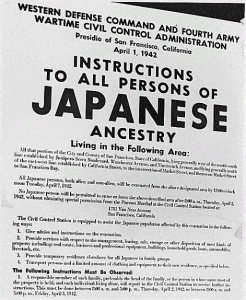
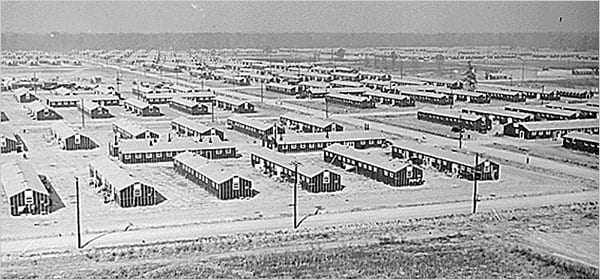
In listening again to the Letters from the Internment Camps VT, I think there is one more huge benefit for ELL students: VoiceThread projects develop a common vocabulary across shared experiences. The students now own the words included in the project.

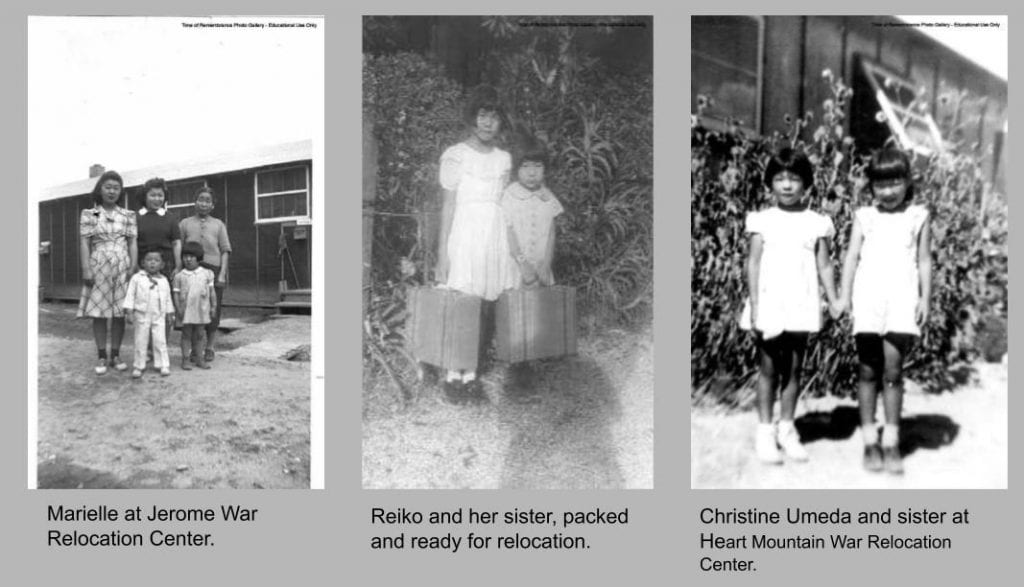
Also, because VoiceThread is online, it promotes another of Lopez’s findings: “ELLs are more likely to experience school success if educators use long-term consistent strategies across all classrooms, along with efforts to involve parents and the community.” As luck would have it, last week several of the wonderful, inspiring citizens of Japanese heritage I’ve worked with in the Time of Remembrance Oral Histories Project came by my office.  When I played the VoiceThread for them, they were astounded at how well this group of elementary students has captured what the internment experience was really like. On Tuesday, Reiko Naguma, who joined the VT discussion to fully describe the experience of using the camp bathrooms, returned, bringing with her Flora Ida Ortiz, who 65 years ago was Reiko’s pen pal. Yep, we taped the interview and will soon add a few clips to the VoiceThread.

I can’t think of another technology that would allow these (Title 1) students to so quickly create a dynamic, growing community as well as to create content that will help reserve the living voices of those who experienced exclusion and forced removal first hand. What a powerful lesson on the importance of understanding and protecting the rights guaranteed to all US citizens! What a powerful project for ELL students - and all students, no?!

I’m intrigued by the topic of resiliency. I’ve spent quite a bit of time at several Title 1 elementary schools this year, working with 4th graders on technology-infused projects.  What I have observed is that, despite grinding poverty levels and what are often intolerable, grossly unfair home situations, for the most part, kids are amazingly resilient.  In each classroom there are three to four students who are unable to maintain and need a bit of physical space away from their classmates, but the rest of the class manages to get through the day much the same as as their more affluent counterparts at wealthier sites. Why is that? What’s the key to being resilient? And what can we learn from our students about resiliency?

When Paul Allison’s email arrived last week, with an invitation to listen to a Teachers Teaching Teachers podcast on resiliency, I rearranged my work schedule so I could make it home in time to join Wednesday’s conversation. It was worth risking a speeding ticket in order to join NWP ‘thinking partners’ Lynette Herring-Harris, Suzanne Linebarger, and Vanessa Brown, and others who would be  leading the discussion.

I’ve learned to keep a notebook with me during the TTT sessions to record resources, strategies, and great quotes, such as:

I’ve added the above titles to my summer reading list and also made a note to myself to contact Suzanne Linebarger directly to learn more about the work she is doing up north in Butte County with third graders, especially the program she developed to combine technology with the genre of cooking to build resiliency in her students.  I’ve known Suzanne for about ten years, through our Writing Project connection, and am always blown away by her insights, her work - and her humor. Her latest gem was during Wednesday’s TTT session, when she mentioned how she deals with the lack of Internet connectivity at home that is a reality for most of our Title 1 students: Start them thinking about where they can get online: a neighbor’s house, a relative’s house, the public library, etc.  On Thursday, when I headed in to work with a classroom on a VoiceThread project (please checkout the project embedded below), I found myself ‘going live’ with those same problem-solving strategies.  When I asked how many had Internet access at home, few raised their hands, but when I threw out some suggestions, heads started nodding.  OK, Suzanne, where are you posting your work?!

My contribution to the topic of resiliency is to share a bit about that VoiceThread mentioned above. Halie Ferrier, the wonderful teacher who had asked me to come work with her students, had also organized in May a Day of Tolerance unit for her 4th grade team.  I suggested that she invite Marielle Tsukamoto in to speak with the students on tolerance and resiliency.  Marielle has worked with me on the Time of Remembrance Oral Histories Project.  We’ve tried to capture through interviews the lived experiences of those citizens of Japanese heritage who were denied their Constitutional rights following the bombing of Pearl Harbor. Each interview is testament to resiliency.

Following Marielle’s visit, along with a reading of Yosiko Uchida’s The Bracelet, Halie’s students stepped back in history, assumed the role of internees, and wrote letters to a friend back home, along with an accompanying piece of art. Thanks to VoiceThread, the students’ historical fiction is now crossing genre lines and mixing with biography, as Marielle and others who experienced discrimination, exclusion and forced removal first hand begin to join in the discussion:

Oh, and the image of bamboo - It symbolizes resiliency in all its forms.

    Image copied from http://i61.photobucket.com/albums/h71/navigate53/Inspirational-2/bambootree.gif
May
30

As the school year draws to a close, how do you document those moments, events, or projects that made a difference to you as a teacher - and to your students as learners? I really like the model National Writing Project colleague Bonnie Kaplan has produced. The combination of a 3rd person narrator using voice over (mostly) stills makes a good story even more compelling.

Dover DS Intro from Bonnie Kaplan on Vimeo.

And I’d like to thank my friend Kevin for sharing his reflections on bringing movie making into his 6th grade curriculum and for pointing me to Bonnie’s gem.